

OnMed dental chart animationSample data. Tooth 16 is selected, caries is charted on its centre and top surfaces, a tooth note is added and the chart is saved.OnMed · Doctors’ roomDental chartTooth notes01Images & X-rays0 / 5Dental chartChoose a condition, then select tooth surfaces to update the chart.1 tooth with cariesUnsaved changesUndoUndo✓ Save chartSelect toothSelect toothCariesCariesFillingCrownUneruptedExtractedTo be extractedClearⓘ The selected tool stays active until you choose another.UPPER RIGHT · Q1UPPER LEFT · Q21112131415171821222324252627285152535455616263646581828384857172737475414243444546474831323334353637381616LOWER RIGHT · Q4LOWER LEFT · Q3Select a tooth or choose a condition tool to begin.16Upper rightFirst molarTooth 16 selectedCentre · SoundCentre · CariesTop · SoundTop · CariesBottom · SoundLeft · SoundRight · Sound0 notes for this tooth1 note for this tooth+ Add noteClear toothNotes For - 16Add a clinical note for this tooth.Tooth note *Caries on centre and top surfaces.Plan: composite filling next visit.Cancel✓ Save noteSuccess!Success, notes saved successfully.Success!Dental chart saved successfully.
Illustrative animation of the OnMed dental chart, using sample data.

OnMed by Object Nation

Connect appointments, clinical records and billing in one platform.

OnMed is our flagship healthcare management platform for clinics, medical and dental practices and healthcare organisations. It began as DentalFirst and has grown into a connected system for the whole patient visit.

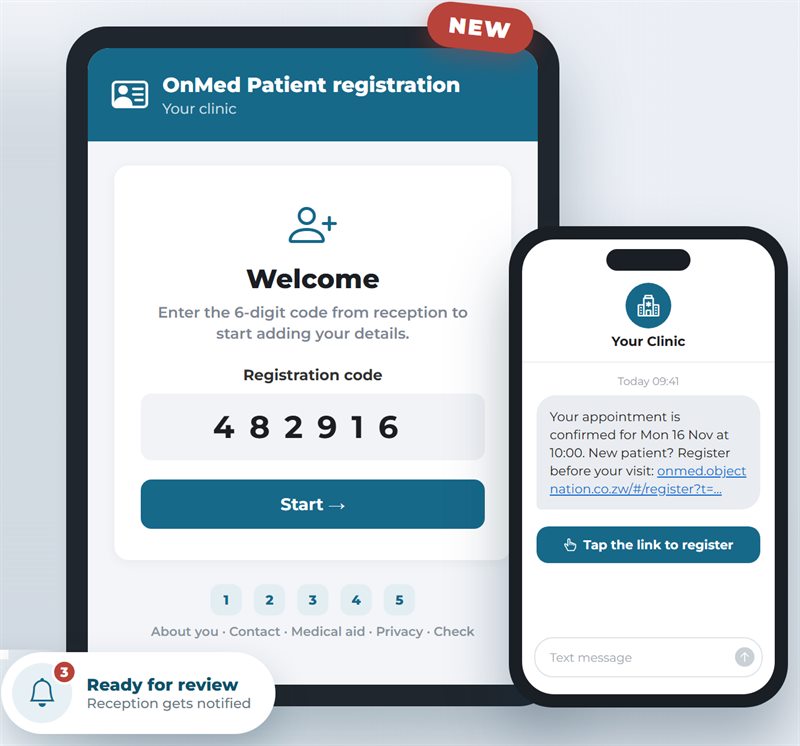
Tablet showing the OnMed patient registration screen with a six-digit registration code, and a phone showing an appointment SMS with a link to register before the visit.
Product screens with sample data.
A clinician in a white coat using a tablet.

Our product story

From DentalFirst to OnMed.

OnMed started as DentalFirst, a dental practice management solution. It evolved into the broader healthcare management platform it is today.

Dental workflows remain part of OnMed, alongside general practice consultations, patient registration, appointments, billing, claims and reporting. If you knew us as DentalFirst, or followed an old DentalFirst link, you are in the right place.

Product tour

See how OnMed handles everyday work.

Fig. 01 / Patient self-registration

  1. Code or linkOne-time code or time-limited SMS link
  2. DetailsPersonal, contact and medical aid
  3. ReviewBy reception
  4. Patient fileLinked or created
Illustrative workflow. Self-registration is set up by the clinic.
01 / Registration

Patient self-registration, reviewed by reception.

New patients enter their personal, contact and medical aid details on a clinic tablet using a one-time code, or from a time-limited SMS link. Each submission is reviewed by reception before it is linked to an existing patient file or creates a new one.
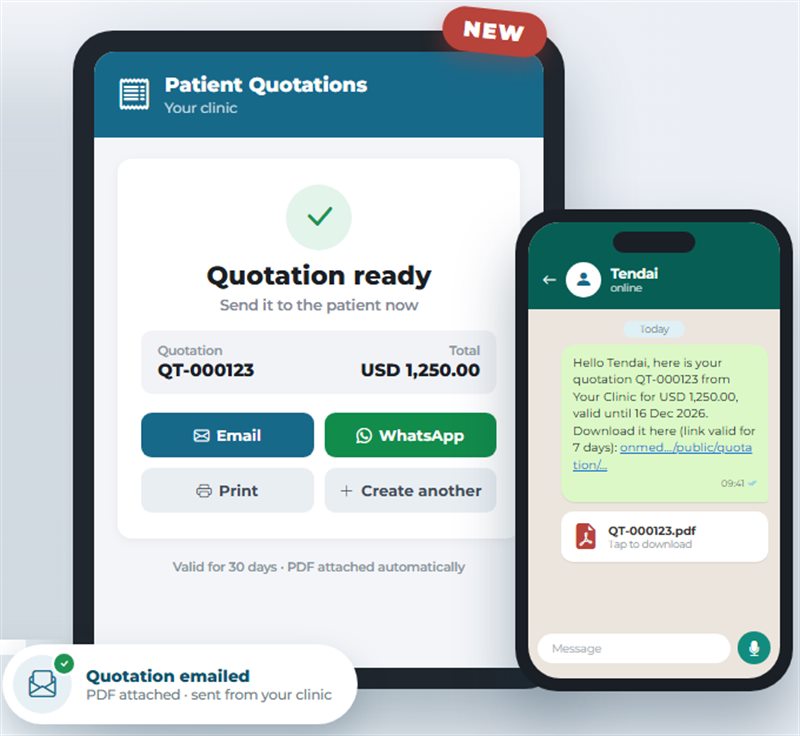
Tablet screen showing a quotation ready to send by email or WhatsApp, and a phone showing the quotation received as a WhatsApp message with a PDF.
Product screens with sample data. WhatsApp delivery depends on your package and an approved connection.
02 / Billing

Quotations by email and WhatsApp.

Create a patient quotation and send it as a PDF by email from your clinic’s own address. Where a WhatsApp connection is configured and approved, you can also send it as a WhatsApp message with a secure, time-limited download link.

Capabilities

Everything a patient visit needs, connected.

Available capabilities depend on your package and configuration. We will confirm what applies to your organisation during a demo.

  • Patient registration

    Register patients at reception, or let them self-register on a clinic tablet or from an SMS link, with reception review.

  • Appointments and reception

    Book appointments by provider, manage reception queues and send SMS appointment reminders.

  • Clinical records

    Document consultations, prescriptions and nursing notes in role-specific workspaces.

  • Dental charting

    Chart teeth and record tooth-level notes within OnMed for Dental Practices.

  • Investigations

    Request investigations and record tests as part of the consultation workflow.

  • Billing, claims and remittances

    Raise invoices and quotations, manage medical aid claims and track remittances.

  • Patient communication

    SMS messages and, where configured and approved, WhatsApp communication.

  • Reporting

    Daily and monthly income, overall receipts and patient visit reports.

  • Multiple clinics and roles

    Role-based access and multi-clinic organisation management, with each organisation kept separate.

Workflow

From reception to reporting.

An illustrative visit in OnMed. Each step uses the information captured before it, so staff do not re-enter the same details.

  1. 01

    Register

    Capture patient and medical aid details once, at reception or by self-registration.

  2. 02

    Book and check in

    Schedule by provider, send reminders and manage the reception queue.

  3. 03

    Consult and record

    Document consultations, prescriptions, investigations and dental charts.

  4. 04

    Bill and claim

    Raise invoices and quotations, submit claims and track remittances.

  5. 05

    Report

    Review income, receipts and patient visits.

Security and data handling

Role-based access, separate organisations, reviewed self-registration and consent for WhatsApp communication. Read how OnMed handles patient information.

Security & data handling
In development

Administrative AI, coming to OnMed

We are developing administrative AI features, such as appointment assistance and approved follow-ups. They are not yet generally available. OnMed does not use AI to make diagnoses or treatment decisions.

AI & Innovation

For practice owners and administrators

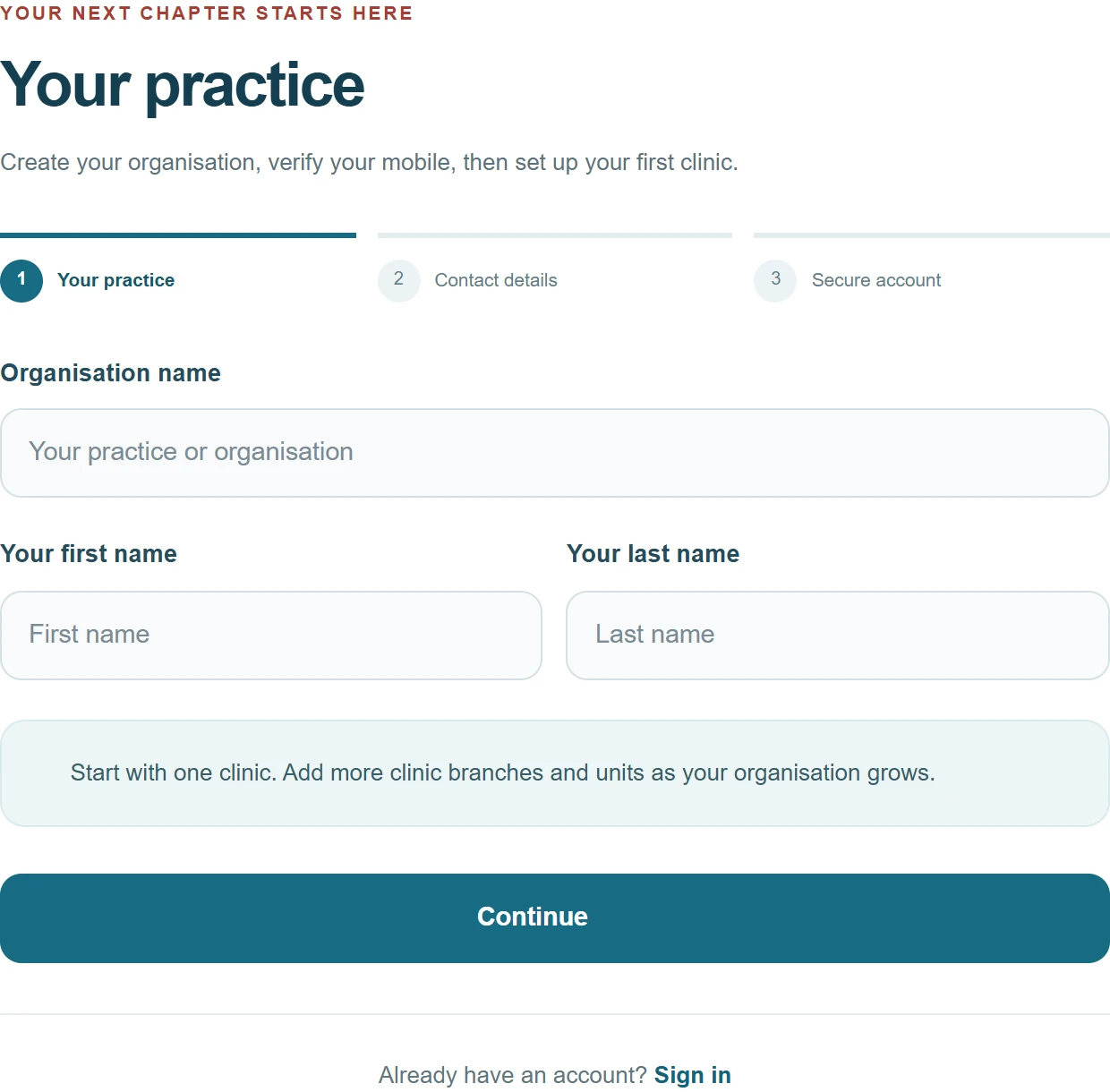
Get started with OnMed.

Create your organisation online, then follow the guided verification and clinic setup.

OnMed questions

Is OnMed the same as DentalFirst?

OnMed started as DentalFirst, a dental practice management solution, and evolved into today’s broader healthcare management platform. Dental workflows remain part of OnMed.

Who is OnMed for?

Clinics, medical and dental practices and healthcare organisations that want to connect registration, appointments, clinical records and billing. If you run a hospital unit, laboratory or specialist service, request a demo and we will assess how OnMed fits your workflows.

Can I sign up without booking a demo?

Yes. Use "Sign up for OnMed" to create your organisation on the OnMed platform. The three account-creation forms collect your practice, contact and security details. You then sign in, verify your mobile, set up your first clinic and complete account verification before full access. Online sign-up currently uses a Zimbabwean mobile number (+263). You can still request a demo or contact us for help.

Does OnMed support medical aid claims?

Yes. OnMed supports invoices, claims and remittance tracking. Electronic claim submission depends on the funders and integrations supported for your setup.

Can OnMed send WhatsApp messages?

Where your package includes it and a WhatsApp connection has been configured and approved, OnMed can send messages such as quotations by WhatsApp, subject to patient consent. SMS and email are also available.

How much does OnMed cost?

Pricing depends on your organisation, the package you choose and the number of clinics and users. Request a demo and we will discuss the options with you.

I am a patient. Can you help with my appointment or records?

We cannot access patient records or give medical advice. Please contact your clinic or practice directly.

See OnMed with your own workflows.

Tell us about your organisation and the workflows you want to see. We will contact you to arrange a demo.

Request an OnMed demo